Complete a participating game's event objective, return to The Hollow, and confirm the badge redemption when it appears. Spend the resulting tickets in Little Shop of Terror. Completing a partner quest, redeeming tickets, and claiming its wearable reward can require separate interactions.
This guide distinguishes published payout reports from the shop purchase footage we have checked. We have not farmed every route on a site account or verified a repeatable ticket-per-minute method.
Earn tickets and redeem the badge
- Open Little Shop of Terror from the lobby ticket icon or the cinema concession counter.
- Choose Visit Games and read the objective and advertised payout before teleporting.
- Complete that game's current Hollow objective. Entering a game alone does not establish that its quest badge has been earned.
- Return to The Hollow on the same Roblox account. If the REDEEM BADGES panel appears, check its badge and ticket amount, then select Confirm.
- Check the ticket balance after redemption. For a wearable partner reward, also finish its separate hub display or hidden-room claim.
The return-and-confirm sequence appears in both TechWiser's ticket guide and AllThingsHow's documented redemption. The latter shows the redemption panel rather than treating a partner game's completion screen as the final ticket payout.
Check the payout instead of assuming 20 or 40
Published reports do not support one guaranteed amount for every game and every objective. AllThingsHow records Visit Games prompts advertising 20 tickets, but its Solar Requiem: Night I (Easy) redemption from Tower Defense Simulator pays 40. TechWiser describes separate participation and quest rewards. Those descriptions are not interchangeable guarantees.
Read the live objective and final redemption panel. Do not calculate the time needed for a 100-ticket purchase from a single reported payout, or assume that repeating a completed objective pays again. We have not verified repeatability or a fastest farming route.
For quests that award named accessories, the 35-item checklist and claim steps identify the final reward location. They are an accessory directory, not an exhaustive list of every ticket-paying objective.
Tools for the dark maze
| Tool | Reported ticket price | Purpose |
|---|---|---|
| Flashlight | 20 | Brief forward illumination |
| Night Vision Goggles | 40 | Visibility in dark areas |
| Radar Detector | 80 | Nearby-entity detection |
| Invisibility Cloak | 120 | Temporary invisibility |
These prices agree across the two shop reports linked above; check the live card before buying. Tool duration and recharge descriptions differ between those sources, so this table does not promise a particular cooldown or that a tool defeats every entity. For the dark hospital task, use the Floor 6 guide.
Avatar purchases and Roblox Plus
Choose an Avatar Items card to see its price and eligibility. A ticket balance does not override a Roblox Plus Only requirement. The full shop list keeps all ten recorded avatar purchases together; the examples below help you budget without duplicating that directory.
| Example purchase | Listed tickets | Plus required |
|---|---|---|
| Haunted Harvest Crown | 20 | No |
| Dark Crescent Helm | 80 | No |
| Gourdlord: The Entangled | 100 | No |
| Trick or Treat Tentacles / Squid | 60 | Yes |
| The Spectral Skull of Nevermoor | 100 | Yes |
Prices and eligibility were checked against the recorded shop listings on October 29. They can change as daily items unlock. A Marketplace offer priced in Robux uses a different currency; check the purchase prompt rather than assuming every offer in the lobby accepts tickets.
The Spectral Skull of Nevermoor
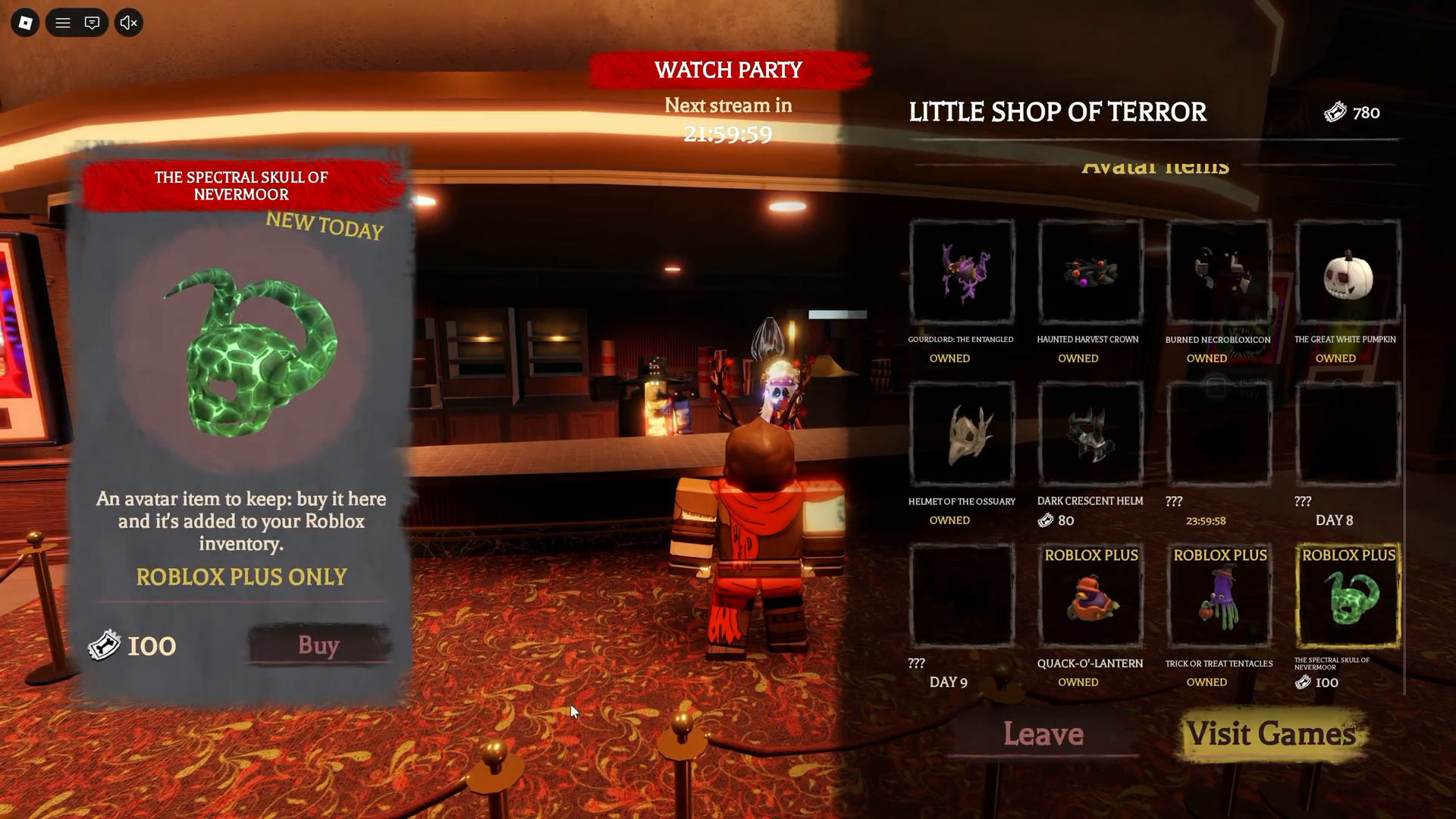
Conor3D's recording shows 100 tickets and Roblox Plus Only on the Skull card at 00:50, followed by OWNED at 00:55. This supports that purchase example, not the availability of every shop item for every account. The Skull claim steps explain the final check.
When tickets or a wearable do not appear
First identify which result is missing. For tickets, check the event objective, badge and hub redemption panel. For a wearable, check its separate pedestal or purchase card, then avatar inventory. A badge ID and an avatar asset ID are different records.
If the required prompt is absent or the expected balance has not changed, this guide has no verified universal bug fix. Do not treat repeated purchases or repeating an entire quest as a proven solution. Keep the completed objective's details available when checking the game's own support information.
Roblox's official announcement gives a reward-collection cutoff of November 2, 2026, noon PST. See the local-time table and check the live shop before leaving spending or claims until the deadline.